
If you use AI to write client emails, summarize documents, or manage everyday business tasks, you may wonder what happens to the information you share. Some AI providers say they do not use business data to train their models by default. However, that does not automatically mean your information is never stored, processed, or accessed.
The good news is that you can take practical steps to reduce these risks. This guide compares business AI offerings from OpenAI, Anthropic, Google, and Microsoft, explains the difference between model training and data retention, and shows you what to check before sharing business information with an AI tool.
The answer is not simply “this AI company is private” or “this plan is paid.” Privacy protections can vary by product, account type, workspace, and settings.
This guide explains how to find AI tools that don’t train on your data, what that promise actually means, and how a solo professional or small business owner can make a safer choice without turning AI adoption into a full-time security project. If you are still comparing options, see our guide to choosing the right AI tools for your solo business.
What AI Tools That Don’t Train on Your Data Actually Promise
When an AI provider says it does not use your business data to train its models, that is narrower than saying the data is never stored, never processed, or impossible for anyone to access.
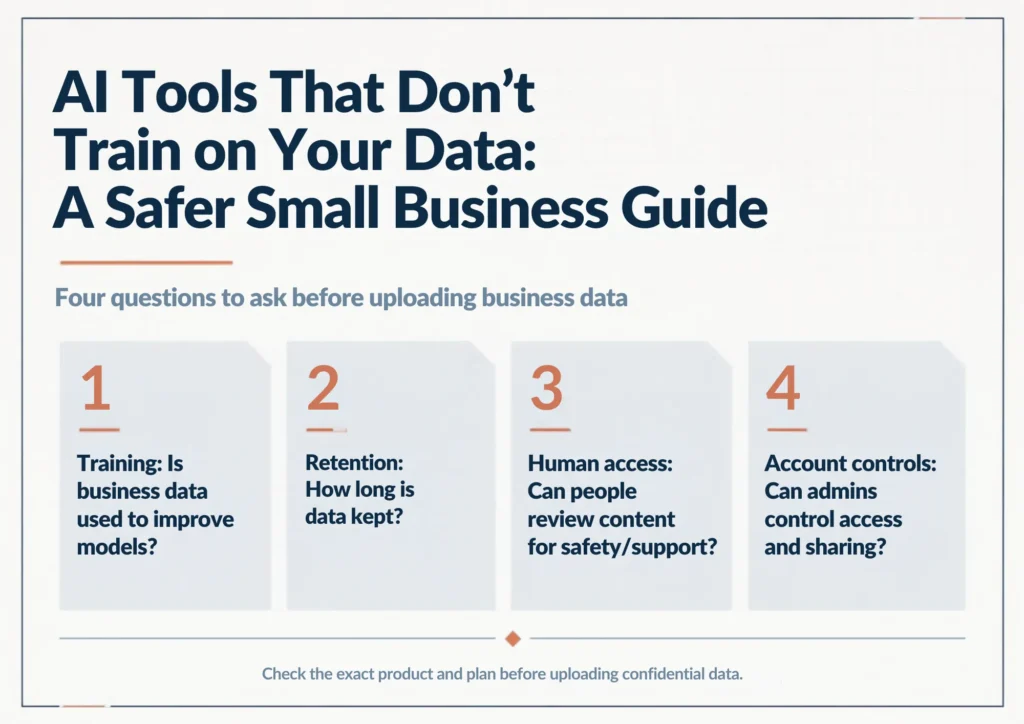
There are at least four separate questions to ask:
- Training: Is your input or output used to improve a general AI model?
- Retention: How long does the provider keep your prompts, files, or conversations?
- Human access: Can employees or reviewers access some content for safety, abuse monitoring, support, or other permitted purposes?
- Account controls: Can your business administrator control access, sharing, retention, or data handling?
A service can answer “no” to training and still retain information for a period of time. That distinction matters when you are dealing with client records, contracts, financial documents, unpublished work, or other confidential material.
The Most Important Rule: Check the Plan, not Just the Brand
This is where many small businesses make a mistake. They search for a company’s privacy policy, see a reassuring statement, and assume it applies to every product that company sells.
It may not.
OpenAI says it does not use data from ChatGPT Business, ChatGPT Enterprise, or its API platform to train its models by default. Check the terms for the specific product and account you use, because consumer ChatGPT settings and business offerings can differ.
Its consumer ChatGPT products have different data controls. OpenAI also says business data is encrypted in transit and at rest. See OpenAI’s business data policy.
Anthropic makes a similar distinction. Its Trust Center says conversations and coding sessions from commercial products such as Claude for Work and the Anthropic API are not used for model training by default, unless the customer explicitly opts in. Anthropic also documents separate retention and security practices. See Anthropic’s explanation of model-training data use.
Google says it does not use Google Workspace customer data to train or fine-tune its generative AI models without the customer’s prior permission or instruction.
These protections apply to covered Google Workspace editions and Gemini features, not automatically to consumer Gemini Apps, which have different data-use and privacy terms. See Google’s Workspace AI privacy information.
Microsoft says Microsoft Copilot does not use customer data to train its foundation models, and Copilot respects existing Microsoft 365 permissions. However, consumer Copilot has separate data-handling rules. See Microsoft’s Microsoft Copilot privacy documentation.
Four Practical Choices for a Small Business
| Option | Best fit | Training position | What to verify |
|---|---|---|---|
| ChatGPT Business or API | General business assistance, writing, research, and integrations | Business, Enterprise, and API data are not used to train models by default | Exact product, retention terms, and workspace or API controls |
| Claude for Work | Document-heavy writing, review, and analysis | Commercial product inputs and outputs are not used for training by default | Retention rules and feedback or opt-in exceptions |
| Google Workspace with Gemini | Businesses already using Google Workspace | Workspace customer data is not used to train or fine-tune models without permission or instruction | Eligible Workspace plan versus consumer Gemini, plus file permissions |
| Microsoft Copilot for Microsoft 365 | Businesses using Microsoft 365 apps and services | Enterprise Data Protection applies to prompts, responses, and organizational data processed by the service | Exact Copilot product and license, data protections, and Microsoft 365 permissions |
1. ChatGPT Business or the OpenAI API
If your business already uses ChatGPT, the important distinction is between a personal workspace and a business offering.
ChatGPT Business is designed as a shared business workspace, while the API is intended for developers building AI into their own applications and workflows.
These are different products with different setup and billing considerations, so choose based on how your business plans to use AI.
Why consider it: a broad general-purpose workspace, with a separate API route when you need to connect AI to business software or workflows.
Watch for: account type, retention settings, shared links, connected applications, and who inside the workspace can access business information.
Pricing: pricing varies by product and usage, so check the current ChatGPT business pricing page before budgeting.
2. Claude for Work
Claude is another useful example of why plan-level research matters. Anthropic’s commercial products are covered by a different data-use policy from consumer Claude.
For Claude for Work, pay particular attention to retention settings and the circumstances in which feedback may be used to improve services. Anthropic documents separate retention practices for its commercial products, so review the terms that apply to your organization.
Why consider it: a useful option when much of your work involves reviewing long documents, drafting, and detailed analysis.
Watch for: the difference between commercial and consumer products, retention settings, and whether your use case needs additional contractual or compliance protections.
Pricing: Claude’s business pricing can change, so use Anthropic’s current pricing page rather than relying on an old comparison article.
If your business already lives in Gmail, Docs, Drive, Sheets, and Meet, Google Workspace can be a practical route because the AI features operate inside a business productivity environment.
3. Google Workspace with Gemini
A practical consideration with Workspace is file access: Gemini works with the permissions already assigned to each user. Review shared-drive access and document permissions before enabling AI features, and do not assume that consumer Gemini has the same protections as an eligible Workspace account.
Why consider it: Gemini can fit naturally into an existing Workspace environment, reducing the need to move everyday work into a separate AI app.
Watch for: consumer Gemini and managed Workspace Gemini are not interchangeable from a privacy perspective.
Pricing: Google Workspace pricing depends on the edition and current promotions. For example, Google’s current U.S. pricing page lists Workspace plans with Gemini features and promotional pricing, so check the official Workspace pricing page before choosing a plan.
4. Microsoft Copilot
Microsoft Copilot is worth considering if your business already uses Outlook, Word, Excel, PowerPoint, Teams, and OneDrive.
Copilot can work with organizational content that a user is already permitted to access, which makes existing SharePoint, OneDrive, and Microsoft 365 permissions important.
Review those permissions before rollout, and confirm the exact Copilot license and enterprise data protection terms for your account.
Why consider it: it can work across Microsoft 365 apps and organizational content, subject to your license, configuration, and existing permissions.
Watch for: Copilot licensing, included features, and usage limits depend on the plan. Check the official pricing page before budgeting.
Pricing: Copilot licensing and bundles can change, and some features or agent usage may be metered. Check Microsoft’s current Copilot Business pricing before budgeting.
What These Privacy Promises Do Not Mean
“Not used to train” is useful, but it is not a complete security assessment.
For example, a provider can still process your information to answer your request. It may retain certain data for a limited period.
Your own account can also create risk if you share a conversation publicly, connect an unsafe third-party application, give the wrong person access, or upload more information than the task requires.
That is why a good small-business AI policy should not stop at “we use tools that do not train on our data.” It should also say what employees or contractors are allowed to upload and which types of information require extra approval.
A Simple Data Rule for Solo Professionals
You do not need a complicated classification system to start.
| Type of information | Practical approach |
|---|---|
| Public information | Generally fine for ordinary AI tools, subject to normal account and privacy settings. |
| Routine business material | Use a business-grade workspace when possible and check the provider’s data-use terms. |
| Client-confidential information | Use a plan with clear business data protections and only upload what the task requires. |
| Highly sensitive or regulated information | Check contractual terms, retention, access controls, and any industry-specific requirements before using AI. |
This is not legal advice. Privacy and regulatory obligations depend on your business, customers, location, and the information you process.
How to Check an AI Tool Before Uploading Business Data
Use this five-minute check before adopting a new tool.
Step 1: Find the exact privacy policy
Do not rely on a homepage statement such as “your data is safe.” Find the provider’s privacy, security, or data-use documentation.
Step 2: Identify the exact product and plan
Write down the plan you are actually considering. Free, personal, team, business, enterprise, and API offerings can have different rules.
Step 3: Look specifically for training language
Search the provider’s documentation for phrases such as “train our models,” “improve our models,” “customer data,” “inputs and outputs,” and “opt out.”
Step 4: Check retention
Find out how long prompts, files, recordings, or outputs are kept. “Not used for training” does not automatically mean “deleted immediately.”
Step 5: Check access and connected apps
If the AI tool connects to Gmail, Drive, Microsoft 365, a CRM, accounting software, or another system, review exactly what it can access. A private AI model does not make a poorly configured integration safe.
What Should You Never Paste Into an AI Tool by Default?
For a small business, a conservative starting rule is simple: do not paste sensitive information just because an AI assistant makes it convenient.
Be especially careful with passwords, authentication codes, payment card details, full bank account information, private customer records, government identification numbers, confidential legal documents, and information covered by a contract or professional confidentiality obligation.
For some tasks, you can reduce exposure by replacing names with neutral labels, removing account numbers and addresses, or summarizing the relevant facts instead of uploading the original record.
This is risk reduction, not a guarantee of anonymity: details in a document may still identify a person or business.
Is a Local AI Model Automatically Safer?
Not automatically.
A locally running model can reduce the amount of information sent to an external AI provider. If you want to understand this approach in more detail, read our guide to edge AI for small businesses Prompts may then be processed on your own computer.
That can be useful when you need more control over where data is processed. However, local AI still requires secure devices, protected model files, encrypted backups where appropriate, access controls, software updates, and careful handling of any connected services.
For most solo professionals, the practical question is not simply “cloud or local?” Consider the sensitivity of the information, your technical ability to maintain the setup, and whether the model or its integrations send data to outside services. Choose the simplest arrangement that meets your actual privacy requirements.
A Better Way to Use AI With Client Information
Use data minimization as a habit: give an AI assistant only the information needed to complete the task. A business plan with stronger data protections does not remove the need to limit unnecessary uploads.
For example, suppose you want help writing a reply to a late-payment email. You probably do not need to upload the client’s entire account history.
Remove unnecessary identifying information, provide the relevant facts, ask the AI to draft the response, and review it yourself before sending.
This approach reduces exposure while keeping most of the productivity benefit.
What I Would Choose for a Small Business
There is no universal winner.
- Already using Google Workspace? Start by evaluating Gemini in your managed Workspace environment.
- Already using Microsoft 365? Microsoft Copilot is worth evaluating before adding another standalone AI system.
- Want a general-purpose AI workspace? Compare ChatGPT Business and Claude for Work against your actual workflows.
- Building an automated AI workflow? Review the provider’s API terms, retention controls, access model, and logging requirements before connecting business data. Our beginner’s guide to AI workflow automation can help you plan the workflow itself.
The important point is that “private AI” is not a brand category. It is a combination of product, plan, settings, data handling, and your own workflow.
A Practical Privacy Checklist for Your Business
- Know which AI tools your business is using.
- Know which account or plan each tool uses.
- Check whether business inputs and outputs are used for model training.
- Check retention instead of assuming no training means no storage.
- Limit uploads to the minimum information required.
- Review connected apps and permissions.
- Require human review before sending important AI-generated messages or documents.
- Recheck policies before making major changes to your AI workflow.
Frequently Asked Questions
What are the best AI tools that don’t train on your data?
For business use, major options include ChatGPT Business or the OpenAI API, Claude for Work or the Anthropic API, managed Google Workspace with Gemini, and Microsoft Copilot. Their business data policies differ from their consumer products, so verify the exact plan before uploading confidential information.
Does paying for an AI tool automatically make it private?
No. A paid consumer plan is not necessarily the same as a business plan. Check the provider’s current data-use terms for the exact product you are buying.
Is “no training” the same as zero data retention?
No. A provider can avoid using your data to train its models while still retaining information for service operation, security, abuse prevention, or other documented purposes.
Can a small business safely use AI with client information?
It can be possible, but the right approach depends on the information, your contractual obligations, applicable laws, and the AI provider’s terms. Use the minimum necessary data and choose a business-grade setup when confidential information is involved.
Should I use a local AI model instead?
Not necessarily. Local AI can reduce external data sharing, but it also creates device and operational responsibilities. For many small businesses, a properly configured business AI service is simpler to manage.
Bottom Line
If your business uses AI for real work, data handling should be part of the buying decision, not an afterthought.
Start with the exact product and plan. Check the training policy. Check retention. Review connected apps and permissions. Then limit what you upload.
You do not need to avoid AI to protect business information. You need to understand the specific terms of the tool you are using and build a workflow that gives the AI only what it needs.

Michael L. has spent the last one year writing about AI for people who never planned to care about it. He tests tools, cuts through the hype, and explains what actually works for everyday life and small business. No tech background required.